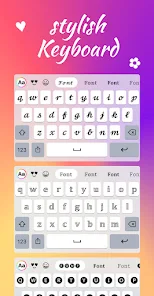
What Is Fonts Keyboard Themes & Emoji?
At its simplest, this app is a replacement keyboard for Android. But unlike Gboard or SwiftKey, which focus on speed and accuracy, this keyboard is all about style. It provides access to over 100 unique fonts, cool symbols, standard emojis, and adorable kaomoji (those Japanese-style text emoticons like ¯_(ツ)_/¯ or (◕‿◕✿)). The idea is simple: type your message in the app, and it converts your text into a special font that you can paste into almost any other app—Instagram, TikTok, WhatsApp, Snapchat, Discord, Twitter, and more. The best part? The person receiving your message does not need the app installed to see the fancy text. The font appears as special Unicode characters that work on virtually any modern device.
The Core Feature: 100+ Fonts for Every Mood and Occasion
The main attraction is the sheer variety of text styles. Based on the listing, you can choose fonts that match your current feeling. Feeling romantic? There’s a flowing script. Feeling chilly or cool? A sleek, modern typeface. Kawaii (cute)? Expect bubbly, playful letters. Gothic? Dark, dramatic characters. The app also includes:
- Stylish fonts (bold, italic, cursive, double-struck, monospace, and more)
- Cool symbols (stars, arrows, hearts, geometric shapes)
- Kaomoji (pre-made text faces for emotions like joy, anger, sadness, and surprise)
- Regular emojis (the standard ones you already know)
You can use these styles for everything: spicing up a text message, creating an eye-catching Instagram story, writing a unique bio, editing video descriptions, or even just journaling with a personal touch. The listing proudly states, “The sky is the limit”—and for creative users, that feels accurate.
How It Works: Simple, Fast, and Universal
One of the app’s smartest design choices is that it does not force your friends to install anything. Because the fonts are generated using Unicode characters (a global standard for text), the styled text will appear correctly on iPhones, Androids, Windows PCs, and even smartwatches. You simply:
- Install the keyboard app and set it as your default (or open it as a standalone app).
- Type your message normally.
- Select one of the 100+ fonts to transform your text.
- Copy the stylized result and paste it wherever you like.
The app also works as a full keyboard replacement, meaning you can type directly into any app without copying and pasting. This seamless integration supports all major Android brands, including Google Pixel, Samsung, Huawei, OnePlus, Vivo, Oppo, Xiaomi, Redmi, Tecno, Infinix, and Realme.
The Big Limitation: No Chinese Font Support
Before you get too excited, there is a critical limitation that emerges clearly in the user reviews. The app is designed for alphabetic writing systems (like English, French, Spanish, etc.). As multiple users point out:
- “This keyboard supports many fonts, but does not support Chinese.” (Google User)
- “Super useful, but I hope they can add Chinese support and a capital lock key.” (KIEHHUNG TING)
If you primarily type in Chinese, Japanese, Korean, Arabic, or any non-Latin script, this app will not style your characters. The fonts only affect the standard A-Z letters, numbers, and basic punctuation. For users who need elegant Chinese calligraphy or stylized Hanzi, you will need to look elsewhere. For everyone else who types in English or other Latin-based languages, this is not an issue.
Privacy and Data Security: What Does the App Collect?
The data safety section of the Play Store listing is relatively reassuring but not perfect. Here is the breakdown:
- No data is shared with third parties (positive).
- Data collected includes: photos and videos, app activity, and two other data types (likely keyboard usage and device info).
- Data is encrypted in transit (meaning your typed text is protected when sent over the internet).
- However, data cannot be deleted by the user (a potential concern if you want to wipe your usage history).
Given that this is a keyboard app—which by design sees everything you type—the lack of data deletion is worth noting. The developer, ABISHKKING LIMITED (based in Hong Kong), does not provide extensive detail on how long data is retained or for what purposes. If you are typing sensitive information (passwords, credit card numbers, private messages), you may want to switch back to a trusted keyboard like Gboard. For casual social media styling, the risk is low.
User Experience: What the 4.9-Star Reviews Say (and Don’t Say)
A 4.9-star rating from 454,000 users is exceptional. The vast majority of reviews are glowing, with users loving the creative freedom and ease of use. One user named “Genshin Impact Main” wrote: “Love it, love it, love it. It can randomly match my favorite fonts. It doesn’t have a huge number, but it’s okay. As long as it has my favorite, that’s good. 𝓵𝓪𝓵𝓪𝓵𝓪𝓵𝓪 😁” (The stylized “lalalalala” in the review proves the app works as advertised.)
However, there are very few negative reviews, and the ones that exist focus on:
- Lack of Chinese support (as mentioned).
- Missing features like a dedicated caps lock key.
- Occasional bugs (though the listing shows a last update in September 2025, suggesting ongoing maintenance).
No reviews mention crashing, invasive ads, or security issues, which is a good sign. The app appears stable and well-loved by its target audience.
Who Should Download Fonts Keyboard?
This app is not for everyone, but for the right user, it is a gem. Here is a quick guide:
Download this app if you:
- Use social media heavily (Instagram, TikTok, Twitter, Discord) and want a unique bio or caption.
- Enjoy creative writing, journaling, or making digital art with text.
- Want to surprise friends with fancy messages in WhatsApp or SMS.
- Type primarily in English or other Latin-alphabet languages.
- Value style over advanced keyboard features (like swipe typing or heavy auto-correct).
Skip this app if you:
- Type primarily in Chinese, Japanese, Korean, Arabic, or other non-Latin scripts (it will not work for you).
- Need a daily driver keyboard for serious work, email, or sensitive data entry.
- Are extremely privacy-sensitive and uncomfortable with any keyboard that collects app activity and cannot delete data.
- Prefer a minimalist, no-frills typing experience.
Final Verdict: A Fun, Specialized Tool—Not a Daily Driver
Fonts Keyboard Themes & Emoji is excellent at what it does: providing hundreds of stylish text options for social media and casual messaging. The near-perfect rating is well-deserved for its niche. The app is easy to use, works across all major platforms, and genuinely adds a spark of creativity to otherwise boring text. The developer has clearly focused on stability and user satisfaction.
However, it is not a replacement for your main keyboard. The lack of support for non-Latin scripts (especially Chinese) will be a dealbreaker for millions of users. And the privacy policy—while not alarming—leaves some questions unanswered about data retention. My recommendation is to install Fonts Keyboard as a secondary keyboard or a standalone font generator. Use it when you want to craft that perfect Instagram bio or send a cute message to a friend. For everything else, stick with your trusted default keyboard.
Bottom line: 4.9 stars, 454,000 users, unlimited creativity—as long as you type in English. For a free, fun way to express your mood through text, this app is hard to beat. Just don’t expect it to handle your work emails or Chinese chats.