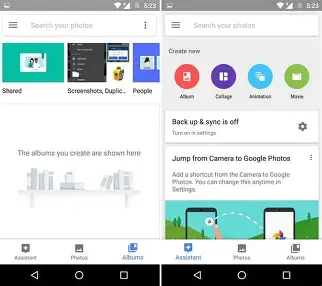
In the digital age, our smartphones have become the primary repositories for our most cherished memories. But with thousands of photos and videos cluttering our devices, finding that one perfect shot can feel like searching for a needle in a haystack. Enter Google Photos, an app that has revolutionized how we store, organize, and interact with our visual world. With over 5 billion downloads and a staggering 52 million reviews on Google Play, it's safe to say this app has become a cornerstone of the Android experience. But what makes it so universally beloved, and what are its current growing pains?
The Core Promise: A Safe Haven for Your Memories
At its most fundamental level, Google Photos offers a secure and intelligent home for all your photos and videos. Every Google account comes with 15 GB of free cloud storage, a generous amount that is shared across Google Photos, Gmail, and Google Drive. This cloud-first approach means your memories are safely backed up and accessible from any device, providing peace of mind if your phone is lost or damaged. The app is designed to be the central hub for all your visual content, automatically backing up new photos and videos and giving you the option to free up valuable space on your device by removing already-saved local copies.
The Power of AI: Search and Organization Redefined
Google Photos is a showcase for the company's prowess in artificial intelligence. The search functionality is nothing short of magical. You can use natural, descriptive language to find specific images, even without tagging or organizing them manually. Searching for phrases like "me and Sarah laughing," "kayaking on a lake with mountains," or "Emma painting in the backyard" will yield incredibly accurate results. This is because Google's AI analyzes the content of your photos—identifying people, places, objects, and even emotions.
Beyond search, the app intelligently organizes your library. It automatically groups similar photos into "stacks" to reduce clutter and creates smart folders for screenshots, documents, and selfies. It also surfaces memories and creates albums, making it easy to relive past events. This AI-driven organization turns a chaotic gallery into a curated, easily navigable collection.
AI-Powered Editing: Professional Results in a Tap
One of the app's most celebrated feature sets is its suite of powerful, AI-driven editing tools. Google Photos has democratized photo editing, allowing anyone to achieve professional-looking results with minimal effort. Key editing features include:
- Magic Eraser: Remove unwanted distractions or people from the background of your photos with a simple tap.
- Unblur: Sharpen and enhance photos that came out blurry, rescuing otherwise unusable shots.
- Portrait Light: Adjust the lighting and brightness on faces to create a more flattering portrait effect.
- Color Pop: Keep the subject in color while turning the background black and white for a dramatic effect.
- Sky Suggestions: Replace a dull, overcast sky with a more vibrant one.
These tools are incredibly intuitive and can transform a simple snapshot into a striking image, all without requiring any prior editing experience.
User Voices: The Fight for Control and the Backup Dilemma
With its massive user base, Google Photos has garnered intense and passionate feedback. The recent reviews paint a picture of deep appreciation for the core service, but also growing frustration with specific aspects of its functionality.
A recurring theme is the lack of granular control over the automatic backup feature. Users like Jackson Yu have expressed that "when automatic backup is turned on, it automatically backs up photos and videos from the camera." They argue that many casual, worthless shots are also backed up, making organization a tedious chore. The user's suggestion is to treat the "DCIM directory as a folder that can be set to auto-backup by default, but also allowed to be set to not backup." This would empower users to be more selective about what is permanently stored in the cloud.
Another user, Jesse杰西, voiced a more frustrated opinion: "Can you please change the automatic backup to manual backup?" They described the ordeal of managing large batches of photos for elderly users and struggling with the lack of "select all" options and the buried location of backed-up files. This user perceives the design as a deliberate "marketing method" to force users into purchasing more storage.
Privacy and Security: A Foundation of Trust
Google Photos places a strong emphasis on the security of your data. According to its safety section, the app does not share your data with third parties. It encrypts data in transit, protecting it as it moves between your device and Google's servers. Furthermore, Google maintains a robust security infrastructure to protect your stored memories. The app also undergoes independent security reviews, adding an extra layer of accountability. Users also have control over their data, with the ability to request deletion, offering transparency and user agency.
The New Storage Management Tool: A Solution to Clutter?
In response to user feedback, Google is rolling out a new storage management tool. This feature is designed to help users easily manage their storage quota by identifying and suggesting photos or videos that might be candidates for deletion. This includes items like blurry photos, screenshots, and large videos. This is a direct and welcome move to address the very clutter many users find overwhelming. It acknowledges the need for smarter, more user-friendly tools to maintain a clean and organized library.
The Verdict: An Essential, Evolving Service
Google Photos is more than just a photo storage app; it's a powerful, AI-driven platform that fundamentally changes how we interact with our memories. Its intelligent search, organizational capabilities, and professional-grade editing tools are unparalleled. While the recent wave of feedback highlights a legitimate user desire for more granular control over backups and a simplified interface for managing large libraries, the developer is clearly listening. The introduction of the new storage management tool is a positive step. For the vast majority of users, Google Photos remains an indispensable and highly recommended service that securely brings order to the chaos of a smartphone gallery